
AI reverse-engineered my printer. I just pressed the buttons.
Getting a printer onto a locked-down network without the vendor app.
Written by Igor Liska and Opus 5.
What I wanted
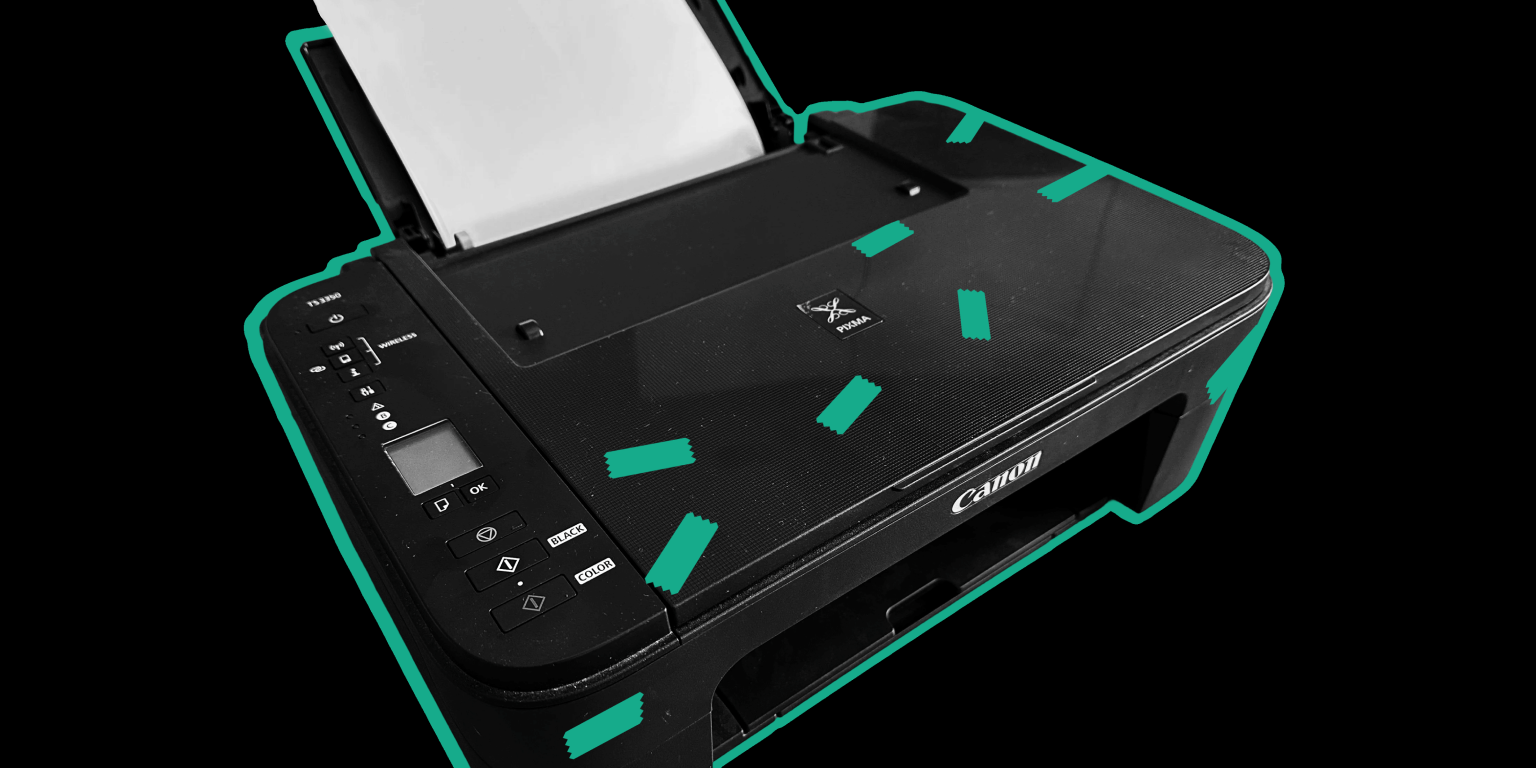
I have a Canon PIXMA TS3300 and a home network it needed to join. That should be a five-minute job, and for most people it is: install the vendor app, tap through a wizard, done.
I did not want to install the vendor app.
Partly, this is taste. Vendor apps tend to be built to a price; they age badly; they want an account; and they quietly make your hardware depend on a company's continued interest in supporting it. A printer is a box that puts ink on paper. It should not need a relationship.
But mostly it was practical. The network I wanted the printer on is filtered by hardware address, and I did not want to add my phone to it.
Here’s the blocker: the Canon app can only set up the printer for the network the phone is currently joined to. So the supported path required letting my phone onto a network I had deliberately kept small, purely so it could tell the printer about it, then taking the phone off and putting the filtering back the way it was. Two reconfigurations of a network I was happy with, in order to avoid learning anything.
Install an app and reconfigure my network twice, in 2026. I would rather spend the same evening teaching an agent to do it, and never think about it again.
Why this is harder than it sounds
A printer fresh out of the box has no network. So it makes its own: a temporary access point that the app connects to in order to hand over the real network's name and password. Canon calls this cableless setup. It is a sensible design, and it means the entire configuration exchange happens over a channel that only exists for about two minutes.
It is worth sitting with the problem the manufacturer has here, because it explains a lot of what follows. The printer and the phone have never met. There is no pairing, nothing to authenticate with. Other vendors solve it by printing a password on the case, or deriving one from the serial number and the manufacturing date. There are not many options. Whatever the printer uses to protect that two-minute window, it has to be something it can tell you itself, which means it is not really a secret.
To do that without the app, I had to speak whatever the app speaks, over that temporary network, within that window.
There was one more constraint: I did not do this work on my laptop. I did it from a container at home that Claude Code lives in: its own filesystem, its own place on the network, and it keeps working when I am not at the computer. That machine has no wireless hardware at all, so it cannot join the printer's temporary network.
What it does have is an old Raspberry Pi on the wired network, and the Pi has a radio. So the Pi became the wireless front end. The agent's machine drives it over Ethernet, and the Pi does the actual joining and relaying.
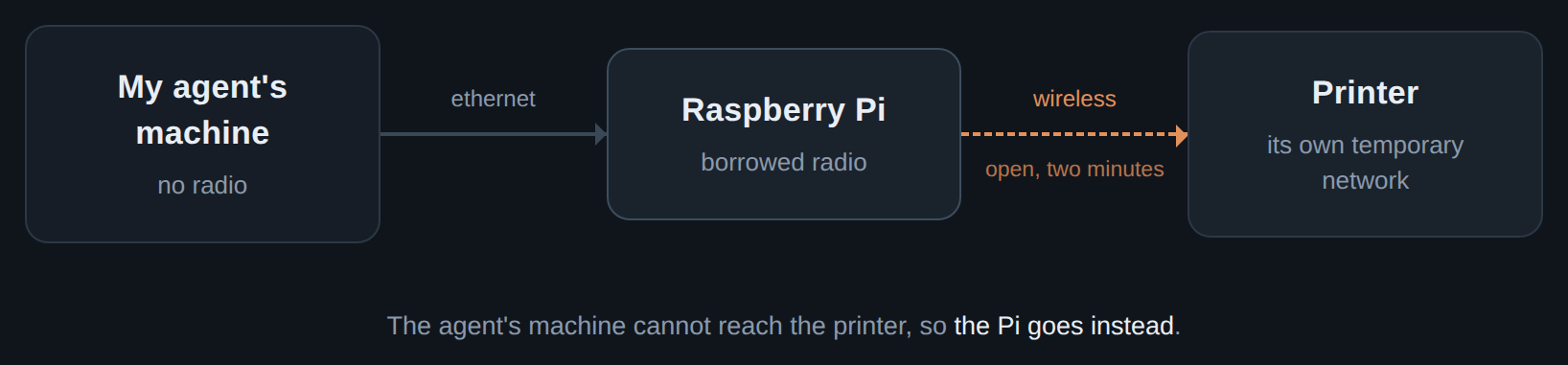
So the division of labor is: the agent gets a Linux box to play in, and I decide what it is allowed to try and press the buttons on the printer. That setup deserves its own write-up, which I will get to, because it turned out to be more interesting than this printer.
Attempt one: read the app
If the app knows the protocol, the app contains the protocol. So we pulled apart the Android package.
What we found: the setup channel is SNMPv3, the version of SNMP that has authentication and encryption. Everything lives under Canon's own branch of the SNMP tree, and the names are not exactly cryptic once you see them together
OID = "1.3.6.1.4.1.1602.1.3"            # 1602 is Canon's enterprise number
O_MODE    = OID + ".2.100.2.0"          # wireless operating mode
O_SSID    = OID + ".2.100.10.3.0"       # network name
O_AUTH    = OID + ".2.100.10.6.0"       # authentication type
O_ENC     = OID + ".2.100.10.7.0"       # encryption type
O_WPAPASS = OID + ".2.100.10.110.0"     # passphrase
O_ENABLE  = OID + ".3.3.1.100.10.1.3.3" # profile enable flag
O_P5      = OID + ".2.100.10.5.0"       # a link field the WPA2 profile wants set to 6
The username is fixed. And the credentials are not a shared secret at all, they are derived from an identifier the printer publishes about itself, called the engine ID. Anyone who can see the printer can compute them.
The derivation is short enough to quote. The printer's engine ID is a public identifier, and the authentication key is built out of it with no secret involved anywhere:
def auth_key_from_engineid(engineid_bytes):
    h1 = engineid_bytes.hex()
    a  = h1[10:]                     # drop the fixed prefix, what remains is the hardware address
    return create_v3_password_hash(a, a, a)
Yes, the same value three times. The function takes three separate inputs, and the app feeds it one value in all three slots, which suggests it was written to be general and then only ever used one way. I have no better explanation than that, and it does not matter, because what matters is doing the same thing.
What that calls into is the part that actually took the work, because Canon does not derive the key the standard way.
The standard one is published in RFC 3414 and it is short. Expand the password to exactly a megabyte, hash it, then hash the result together with the device's engine ID so the key only works on that device:
def password_to_key(password, engine_id):
    buf = (password * (1048576 // len(password) + 1))[:1048576]
    digest = hashlib.sha1(buf).digest()
    return hashlib.sha1(digest + engine_id + digest).digest()
Two hashes. The megabyte of repetition is there to make brute forcing a password expensive, and every SNMPv3 device in the world does the same thing.
Canon runs its own derivation first, and only then applies the standard localization to the result. Recovering that first step meant pulling a shared library apart. In outline:
def derive(a, b):
    block = shuffle(a, permutation_table) + b
    repeat 5 times:
        salt = salt_table[one byte taken from block] # the data picks its own salt
        block = sha256(block + salt)
        block = shuffle(block, next permutation_table)
    return block
None of it is cryptographically interesting. The detail that matters is that the data selects its own salt, which means you cannot guess your way to it from the outside, and every step has to be exactly right or you get nothing back but a complaint about your digest.
At that moment, it looked solved. We had the protocol, the user, and a way to derive the keys.
Attempt one fails, slowly
The first wall was not even the join. It was authentication.
SNMPv3 does not send a password. It sends a digest computed over the message using a key derived from the password and the printer's engine ID, in a specific order, with a specific number of rounds. Get any step wrong and the printer replies with an error meaning "your digest is wrong" and nothing else. It does not tell you which part is wrong. It cannot, without leaking the very thing it is protecting.
We spent a lot of time there. Not on clever cryptography, but on the specific dialect: which bytes go into the hash, in which order, how the key is tied to that particular device. Two layers had to be right at once: Canon's own derivation and then the standard localization on top of it:
rawkey = canon_kdf.auth_key_from_engineid(engineid)      # Canon's custom KDF
lk     = canon_kdf.password_to_key(rawkey, engineid)     # then RFC 3414 localisation
aeskey = lk[:16]                                         # first 16 bytes encrypt
iv     = boots.to_bytes(4,"big") + etime.to_bytes(4,"big") + salt
mac    = hmac.new(lk, msg(b"\x00"*12), hashlib.sha1).digest()[:12]
Every attempt produced the same unhelpful answer. This was the least glamorous phase of the project and easily the most time-consuming.
Eventually the digest matched. The printer accepted our message, took the configuration, tried to use it, and quietly failed.
Finding out that it had failed was its own small ritual. The printer does not report errors over the network. To learn what happened, you make it print its network report, a page it produces on demand, and read the code at the bottom. Ours said C-5.
C-5 means the printer could not join the network. It does not say why. It does not distinguish "wrong password" from "cannot see that network" or "I did not understand your request". We printed that page exactly once, which was enough to know what we were failing at and enough paper spent on the subject. After that, the test became simpler and sadder: run the tool, then look to see whether the printer had appeared on the network. It had not.
The dead ends
I thought of five things that could have caused it.
The network name is hidden. Plausible. A device that scans for networks by listening will never find one that does not announce itself. We turned the broadcast on. Still C-5.
Hardware address filtering. Also plausible, and this one had a wrinkle: the printer has two different hardware addresses, one for its temporary network and one it uses as a client. We worked out which one to allow. Still C-5.
Mixed WPA2 and WPA3. Cheap embedded radios often cannot cope with a network offering both. We made it WPA2 only. Still C-5.
Protected management frames. Same family of problems. Turned off. Still C-5.
Passphrase encoding. Maybe we were sending the password in the wrong form, escaped or encoded differently than expected. We tried the variants. Still C-5.
Each of these was a reasonable theory. We tested them all, and they were all wrong. Each cost a reconfiguration, a walk to the printer, and another look to see whether it had appeared. It had not.
Somewhere around theory four, I remembered why people leave this sort of work to professionals. We have some very good ones at Panaxeo. Maybe I should have called one of them.
Reading was not going to help
At some point, the pattern becomes the message. Five sensible hypotheses, all eliminated, and nothing new arriving to suggest a sixth.
Static analysis tells you what a program can do. It does not tell you what it actually does at runtime, with real values, against a real device. For that, you need dynamic analysis: watch the working thing work.
So we changed the approach. Install the app on a phone, let it do the setup for real, and record the conversation.
I want to be clear that this was a slightly reluctant step, but not for any principled reason. It felt like giving up on the puzzle. I set up a throwaway network for the purpose, ran the app, and let it succeed.
What the wire showed
Here is why the capture was even possible, and it is the same fact that made the whole project feasible.
The printer's temporary setup network is open. No wireless encryption at all. So with the Pi's radio in monitor mode on the right channel, every frame is visible.
So the capture itself is unremarkable:
nmcli device set wlan0 managed no        # stop NetworkManager touching the radio
iw dev wlan0 set type monitor
iw dev wlan0 set channel 6
tcpdump -i wlan0 -w capture.pcap         # then let the app do its thing
The application layer on top is encrypted, but its keys come from the printer's engine ID, which the printer hands out to anyone who asks. We already had the derivation from reading the app, so we could compute the same keys the phone was using and read the exchange:
eng    = discover_engineid(target)                       # the printer just tells you
lk     = canon_kdf.password_to_key(canon_kdf.auth_key_from_engineid(eng), eng)
plain  = Cipher(algorithms.AES(lk[:16]), modes.CFB(iv)).decryptor().update(ciphertext)
Open at the radio layer, and derivable at the application layer. Nothing about that capture required a secret.
And the recording was startling in its simplicity. The entire join, the thing that had eaten the whole evening, is one message. A single SNMP write containing seven values: mode, an enable flag, the network name, an authentication type, an encryption type, the passphrase, and one more counter.
Written out, the whole join is this:
vbs = [
    (O_MODE,    tlv(0x04, JOIN_MODE.to_bytes(4, "big"))),   # 4 = join an infrastructure network
    (O_ENABLE,  enc_int(1)),
    (O_SSID,    tlv(0x04, ssid.encode())),
    (O_AUTH,    enc_int(auth)),                             # 11 for WPA2, stored back as 9
    (O_ENC,     enc_int(enc)),
    (O_WPAPASS, tlv(0x04, password)),
    (O_P5,      tlv(0x42, b"\x06")),
]
authpriv_set(target, vbs)      # one SetRequest. that is the entire onboarding.
Our implementation had been sending seven values too. Two of them were wrong.
The operating mode. The code we read had led us to one value. The app sends a different one. Ours told the printer to do something adjacent to joining a network. It tried, failed, and reported C-5 for its trouble.
The authentication type. This one is genuinely nasty. The value you must send for WPA2 is not the value the printer stores. Read the setting back afterward, and you get a different number than the one that works. So the decompiled source suggested one value, the printer's own read-back confirmed that same value, and both were wrong. Two independent sources of truth agreeing with each other, and neither matching what actually works.
Changing those two numbers made it join immediately. The whole fix is a comment longer than the code:
# op-mode 4 = "join an infrastructure network". We had been sending 8, which is what the
# decompiled code implied, and which left the printer unable to associate and reporting C-5.
JOIN_MODE = 4
A single write carrying seven values. Five of them were right from reading the code. Two were not.
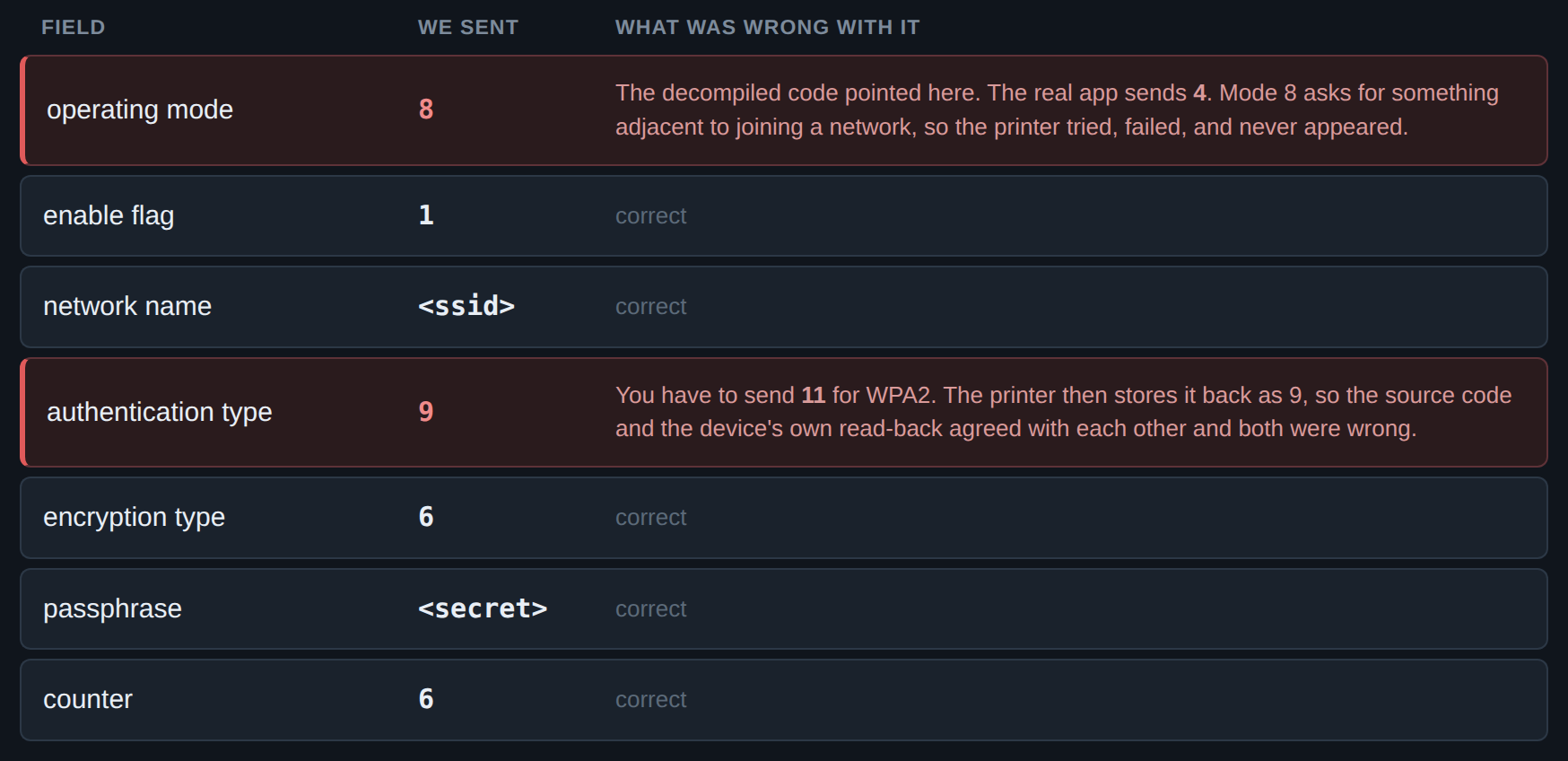
Neither wrong value could have been found by reading, because nothing contradicted them. They turned up only by recording the real app doing the job.
It was never the network
The satisfying part came afterward. Every network theory from the dead ends list was wrong, and worse, they had all been symptoms of the same single wrong number.
Once the mode was right, we put the hidden network name back. It joined. We turned hardware address filtering back on. It joined. All that careful elimination had been measuring the shadow of one incorrect field.
That is the lesson I would point out. When a device fails and tells you nothing, it is very tempting to reason about its surroundings, because the surroundings are the part you can see and change. I spent hours adjusting things I could reach. The wrong thing was in the one place I could not see.
The result
The tool is a few hundred lines of Python. Putting the printer on the network is now:
printer/onboard.py onboard --password "..."
That is the whole thing. It borrows the Pi's radio, joins the printer's temporary network, sends the single message, and the printer turns up on the real network a few seconds later. The relay through the Pi is scaffolding, needed only because the machine running this has no radio. It is not part of the protocol. On a laptop, you would just run the command.
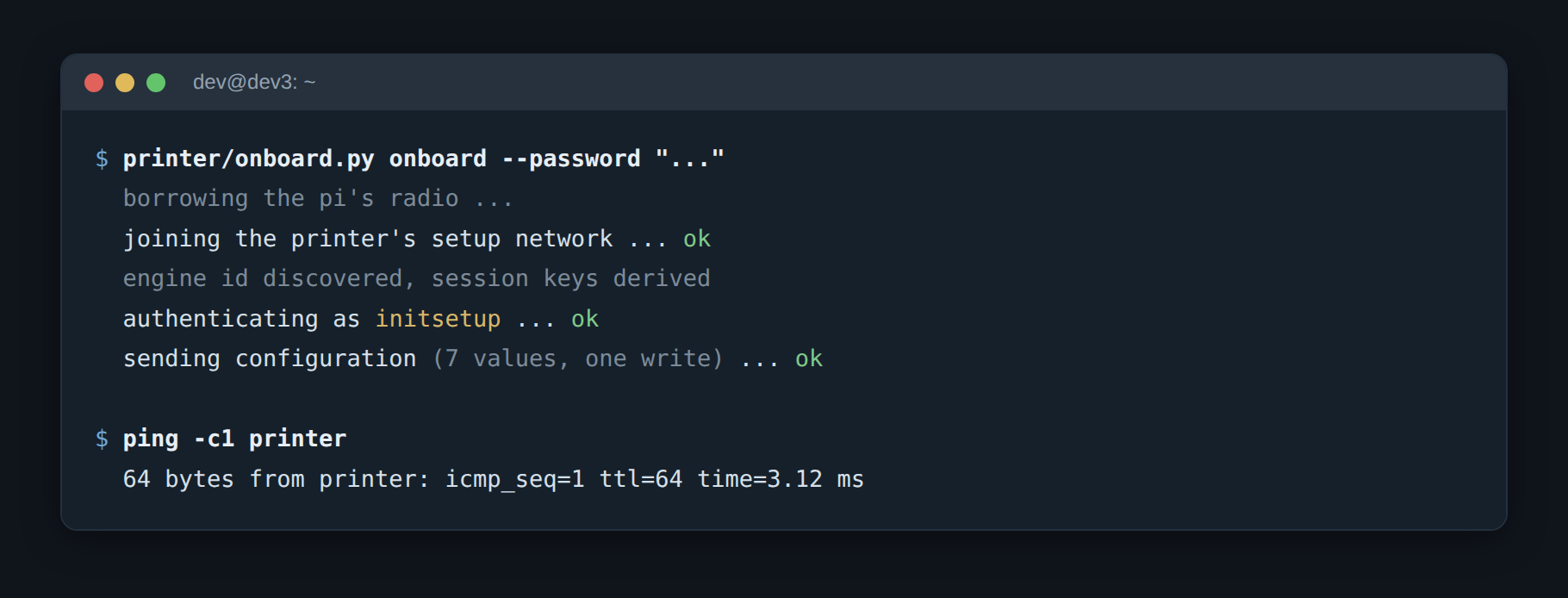
No app. No phone. No account. And when the network password changes, I do not do any of this again. I ask for the printer to be put back on, and go make coffee. Which will matter enormously the next time I change that password, in about five years.
Where the assistant helped, and where it did not
Without an AI assistant, I would not have attempted this at all. Not because any single step was beyond me, but because the whole thing would have taken days instead of an evening, and I would have run out of interest somewhere around the third dead end. That is the honest measure of what it was worth: it turned something I would never have started into something I finished.
The rest of this is the part write-ups tend to skip, so here it is with the flattery removed.
It was very good at: taking apart the Android package and finding the relevant code, implementing SNMPv3 from scratch in pure Python including the key derivation, generating and testing many variants quickly, and keeping track of what had already been eliminated so we did not walk around in circles. The long grind on the authentication digest is exactly the kind of work that benefits from something with infinite patience for byte order.
I had to steer: the decision to stop reading code and start recording the app was mine, and it is the decision that solved the whole thing. So was deciding which theories were worth the cost of testing. And repeatedly, the judgement about whether a conclusion was actually supported: more than once I was told something was confirmed when the evidence was thin, and pushing back on that turned out to be where the value was.
Oh, and I pressed the button on the printer. Dozens of times.
The pattern that emerged goes something like this: AI is fast and tireless at the parts with a clear target, and it needs a person to decide what the target should be and to notice when a confident answer is built on not very much at all. That gap has not narrowed much in the last two years, which is why Panaxeo still hires people rather than seats.
What I would do differently
Use the mobile app and do this process in 5 minutes. Capture first. If a device has a working client, watching it work is a shortcut past every theory you would otherwise eliminate one at a time. The whole project ran to under seven hours, and recording the app took a fraction of that. Doing it earlier would have saved an hour or two, though not more, because reading the app is what made the recording legible in the first place.
And the transferable version, which applies well beyond printers: when the source and the device disagree, the device is right. The decompiler was not lying, exactly. It was showing a value that existed in the code. The printer's read-back was not lying either. Neither was simply the thing that works.
